AI-Powered Google Ads Management — The Best Way to Build an E-commerce Search Campaign from Scratch
How to build a sales-driven Google Ads Search campaign for an e-commerce (sneaker) store from scratch — just by chatting with Opus Growth. A real, step-by-step example from account audit and keyword research to negatives and ad extensions.
Category
Author
Date
Reading time
Share
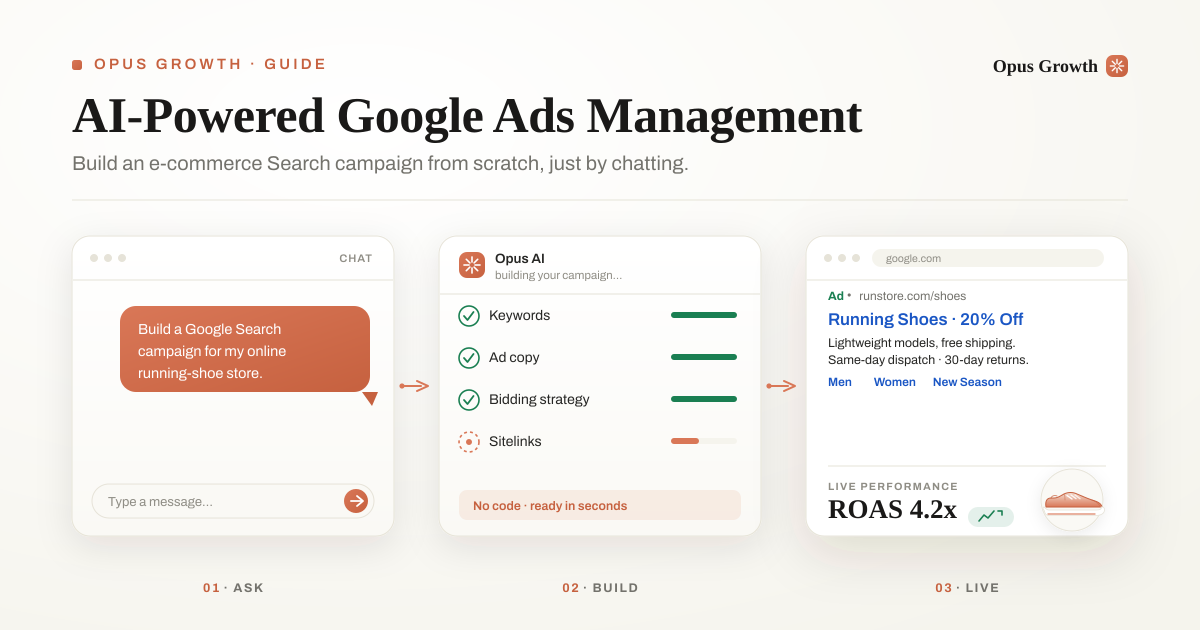
You've subscribed to Opus Growth. So what happens now? Owning a powerful tool and using it well are two different things. In this article we walk through a real example — an online sneaker / sportswear store — to show, step by step, how to get a sales-driven Google Ads Search campaign built from start to finish just by chatting, without writing a single line of code.
The goal isn't to tell you "click this button"; it's to show you how to direct the AI inside Opus Growth as if you were working with a Google Ads expert. All the data below comes from real keyword research; the store's identity has been anonymized.
The golden rule: don't ask for a ready-made plan — have it investigate first
The most common mistake new users make is telling the AI "build me a campaign" and accepting the first plan it produces. A good operator never works this way: they inspect the account and the market first, then decide.
Ask exactly that of Opus Growth. Here's what an effective, "ideal" opening message looks like:
"You're my Google Ads operator. I want you to build a Search campaign that drives sales (online orders) for an online store selling sneakers and sports shoes. Don't impose a ready-made plan on me — first inspect the account and the data, then propose and justify every critical decision, including budget, geographic targeting and conversion goal. Our conversion point is a purchase on the website; add-to-cart is secondary. We ship across Türkiye. Focus the bidding strategy on ROAS but start cautiously — no aggressive spend. Show me every write action as a preview first, and only apply it once I approve. Where you're unsure, don't assume — ask me."
This single message contains the three things that make the difference in quality: investigate first, justify the decisions, and approval/safety rules. Now let's see what the AI does with it.
Step 1 — Before you spend a cent: account audit and conversion health
The one question to answer before spending money is: "Can we accurately measure the results — and the value of each sale?" In e-commerce this is even more critical than for a phone call, because Smart Bidding can only optimize for real profit if it sees revenue, not just the number of orders.
Tell Opus Growth: "First run an account audit and a conversion-tracking health check." The AI typically reports on:
- Is the purchase conversion being measured? A "purchase" conversion should be set up and marked primary. Without it, the ad's real return is invisible.
- Is conversion value (revenue) being sent? The amount of every order must be passed to Google. Without it, target ROAS (tROAS) can't work — the algorithm treats a ₺200 order the same as a ₺2,000 one.
- Are secondary actions defined? Tracking "add to cart" and "begin checkout" as secondary conversions gathers optimization signal even at low volume.
- Any duplicate/incorrect counting? A setup that counts the same order twice misleads the bidding algorithm.
Best practice: If purchase + conversion-value tracking isn't healthy, don't start with a ROAS target. Set up measurement first. The rule "you can't optimize what you can't measure" is doubly true in e-commerce: you have to measure both the count and the amount.
Step 2 — Keyword, search volume and estimated cost research
Tell the AI: "Run keyword, search-volume and estimated cost-per-click research for this store using keyword planner and keyword opportunities." The aim is to separate searches with buying intent from traffic that's only looking for information or inspiration.
A representative example from real research (monthly searches, Türkiye):
| Type | Example search | Monthly volume | Competition | Intent |
|---|---|---|---|---|
| Category | "sports shoes" | ~74,000 | High | High |
| Gender | "men's / women's sports shoes" | ~74,000 / 40,500 | High | High |
| Type | "sneaker" | ~74,000 | Medium | High |
| Product | "running shoes" | ~18,100 | High | High |
| Discount | "cheap / discounted sneakers" | ~1,070 | High | Very high |
| Brand | "nike / adidas shoes" | 135,000–165,000 | High | High* |
*Brand terms have enormous volume but are expensive, and you should only bid on them for brands you actually sell — otherwise you'll run into trademark and quality issues.
The same research also reveals the traffic to avoid: "how to clean sneakers" (~1,300), "sneaker outfit ideas" (~110), "second-hand sneakers" (~70). These are informational or used-product searches; for an online store they spend clicks without producing sales. This list is the foundation of the negative keyword strategy we'll build shortly.
Best practice: Focus on intent, not raw volume. "Discounted sneakers" looks low-volume but is the search closest to a purchase. Ask the AI to group keywords by level of intent.
Step 3 — Critical decisions: budget, geographic targeting and conversion goal
A good AI operator presents these three decisions with reasoning. Opus Growth's typical recommendation and logic:
Daily budget — a cautious start
Average cost-per-click of your target keywords × a reasonable number of clicks you want per day. Instead of starting aggressively on a new campaign, you begin with enough budget to gather data over the first 2–3 weeks; once enough conversions accumulate, you tighten the bidding strategy. Reasoning: Inflating the budget before the algorithm has seen enough orders breaks learning and raises costs.
Geographic targeting — everywhere you ship
Since this isn't a physical service, there's no restriction: you target all of Türkiye and exclude any regions you don't ship to. Over time, you can raise bids in cities that convert well. Reasoning: In e-commerce, narrowing geography unnecessarily caps volume; the right move is to start broad and adjust by city based on performance.
Conversion goal and bidding — based on the value of the sale
The main conversion is an online purchase, with add-to-cart / begin-checkout as secondary. The bidding strategy starts on Maximize Conversions (while data is thin) and moves to Target ROAS (tROAS) or Maximize Conversion Value once data accumulates. Reasoning: The goal of e-commerce isn't order count but profitable revenue; the algorithm must be optimized toward revenue.
Best practice: Ask the AI for the reason behind every decision. A recommendation without reasoning isn't accepted; a justified one is a starting point you can debate.
Step 4 — Getting the campaign built: structure, keywords, ads and extensions
After you approve the recommendations, the AI builds the campaign. A good setup consists of these parts:
Ad groups and match types
Split keywords by theme: "Women's Sneakers", "Men's Sneakers", "Running Shoes", "Discount/Outlet" as separate groups. Each group's ad copy should match its theme exactly. For control at the start, use mostly phrase match and selected exact match; only open up broad match once Smart Bidding has settled and you have a solid negative list.
Negative keywords
Eliminate the harmful traffic surfaced in Step 2 from day one: how to clean, outfit, how to, second-hand, replica, imitation, fake, free and the names of brands you don't sell. This is the single fastest way to cut wasted spend in e-commerce.
At least two responsive search ads (RSA)
Test different angles: one product/discount-focused, the other shipping/trust-focused. Stay within Google's character limits (headline ≤ 30, description ≤ 90 characters). Anonymized example:
RSA 1 — Product / discount focused
- Headlines: New Season Sneakers · Men's & Women's Sneakers · Genuine Products, Fair Prices · Discounted Sneakers
- Description: Hundreds of models, genuine-product guarantee. Free shipping and easy 30-day returns.
RSA 2 — Shipping / trust focused
- Headlines: Free Shipping, Fast Delivery · Same-Day Dispatch · 30-Day No-Questions Returns · Buy Sneakers in Installments
- Description: Cash on delivery, installments and free returns. Order today, at your door tomorrow.
Ad extensions — enlarge your click area
Extensions significantly raise click-through rate and are where e-commerce gains the most:
- Sitelinks: Men's Sneakers · Women's Sneakers · Running Shoes · Discount / Outlet · New Season
- Callouts: Free Shipping · Same-Day Dispatch · 30-Day Returns · Cash on Delivery · Genuine Products · Installments
- Structured snippets: Brands (the brands you sell) · Types: Running, Casual, Basketball, Indoor, Walking
- Price extension: Popular categories and "prices from …" — informs the user before the click.
- Promotion extension: Seasonal discount / coupon — lifts clicks during sale periods.
Language and currency: Turkish ad copy, Türkiye location, TRY currency. The AI sets these up correctly from the start.
Tip: If your catalog is large, adding Merchant Center + Performance Max (or Shopping) alongside the Search campaign significantly boosts e-commerce conversions. You can tell the AI, "once data accumulates, also propose a PMax plan with the product feed." But build a solid foundation and conversion measurement with Search first.
The safety net: preview → approve → apply
Here's what makes Opus Growth agency-safe: no write action goes live without your approval.
Every change arrives first as a preview (dry-run); you see exactly what will be created. If you like it, you say "apply", and only then does it go live. Risky moves — such as a budget increase of more than 50% at once — are blocked, and every applied change is written to an audit log.
Best practice: Treat this flow as your superpower, not a burden. You work at the speed of AI while keeping control of the decisions yourself.
Summary: the 7 golden rules of AI-powered Google Ads for e-commerce
- Don't impose a plan — have it investigate. Account audit and market research first, then decide.
- Measure both the count and the amount. Without purchase + conversion-value tracking, don't start with ROAS.
- Chase intent, not volume. Terms like "discounted sneakers" and "buy sneakers" are closer to a sale.
- Every decision should be justified. Budget, geography, bidding strategy — each must have a reason.
- Negative list from day one. Rule out "how to clean", "second-hand", "replica" and brands you don't sell.
- Don't skip extensions. Sitelinks, callouts, snippets, price and promotion extensions enlarge your clicks.
- Preview, then apply. Take the speed from AI and the control from yourself.
Start building your own campaign today
Every step in this example — from the audit to keyword research, from ad copy to extensions — can be done by chatting inside Opus Growth. The logic of an expert Google Ads operator, with your approval, in minutes. If you've subscribed, just adapt the "ideal opening message" above to your own store and paste it in.
Note: the store in this article is anonymized; the keyword volumes come from real research and may change over time.
Frequently Asked Questions
What are the benefits of using AI for Google Ads management?
AI performs account audits, keyword research, campaign setup, ad copywriting and optimization in minutes, with the logic of an expert operator. In Opus Growth you manage all of it by chatting — no code — and every change arrives as a preview first, going live only once you approve. The result: faster setup, less wasted spend, and campaigns optimized toward revenue.
Can I build a Google Ads Search campaign without knowing how to code?
Yes. With Opus Growth you build campaigns, add keywords, write ads and define extensions by talking to Claude or ChatGPT. No technical knowledge is required; you just give a clear enough opening message and approve the AI's recommendations.
Will the AI change my ad account without my approval?
No. Every write action is shown first as a preview (dry-run) and is only applied once you approve it. Risky moves (e.g. a budget increase of more than 50% at once) are blocked, and every change is written to an audit log. This makes the tool safe for agencies.
Which bidding strategy should I start with for e-commerce?
Start with Maximize Conversions while you lack enough conversion data; once purchase and conversion-value (revenue) tracking has accumulated healthily, move to Target ROAS (tROAS) or Maximize Conversion Value. That way the algorithm optimizes for profitable revenue rather than order count.
Connect your Google Ads to your AI assistant
Try everything in this article on your own account — 60-second setup, 7-day free trial, no credit card required.