AI Ad Management: Run Google, Meta & LinkedIn Ads from One Dashboard—Just by Chatting
Manage your Google Ads, Meta, and LinkedIn campaigns with AI. Talk to Claude or ChatGPT, and track spend, CPC, CTR, and conversions live from a single dashboard.
Category
Author
Date
Reading time
Share
What Is AI-Powered Ad Management?
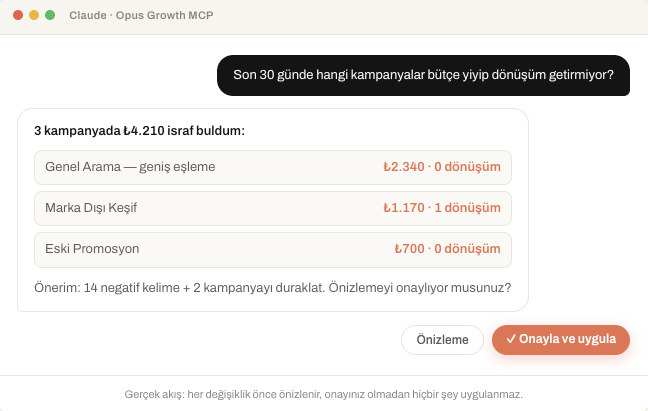
AI-powered ad management means running your Google Ads, Meta (Facebook & Instagram), and LinkedIn Ads accounts in plain language—without getting lost in complicated interfaces. When you say, “Which campaign lost money this week?” or “Add the highest cost-per-conversion keywords as negatives,” your AI assistant carries out the task for you.
That’s exactly what Opus Growth delivers: you connect your ad accounts to an AI assistant you already use, like Claude or ChatGPT, and the assistant turns your natural-language instructions into real ad actions. Behind the scenes, MCP (Model Context Protocol) makes that connection—securely opening your ad data and tools to the AI.
Why Manage Your Ads with AI?
Traditional ad management means three platforms, three separate dashboards, dozens of tabs, and endlessly exporting reports. An AI ad agent lifts that burden:
- One language, three platforms: You don’t need separate expertise for Google, Meta, and LinkedIn. Manage them all from the same chat window.
- Analysis in seconds: Ask “Why did CPC go up over the last 30 days?” and your assistant answers with the data.
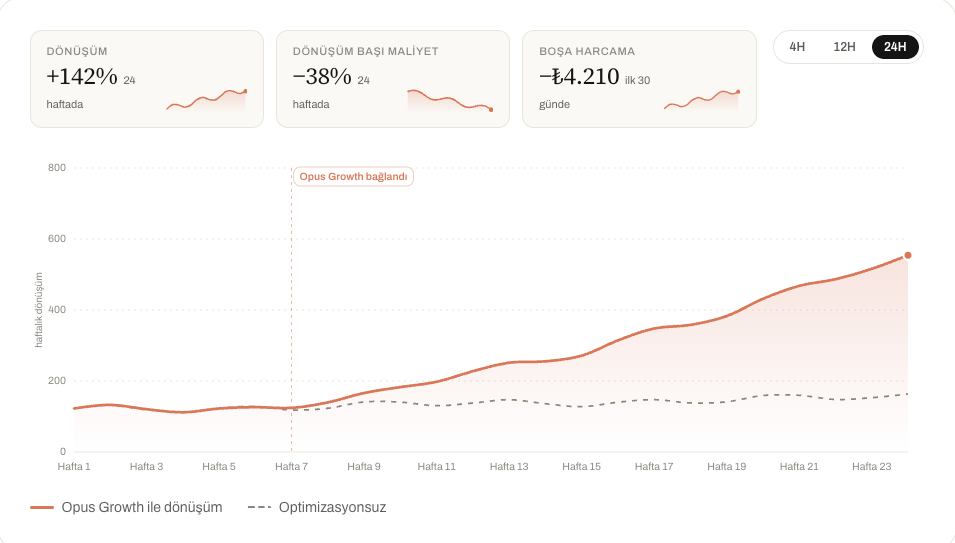
- Actionable, not just informational: It doesn’t just report—it adjusts budgets, adds negative keywords, and updates audiences.
- Around-the-clock oversight: Keep an AI eye on performance even while your account sleeps.
The Performance Dashboard: Every Metric on One Screen
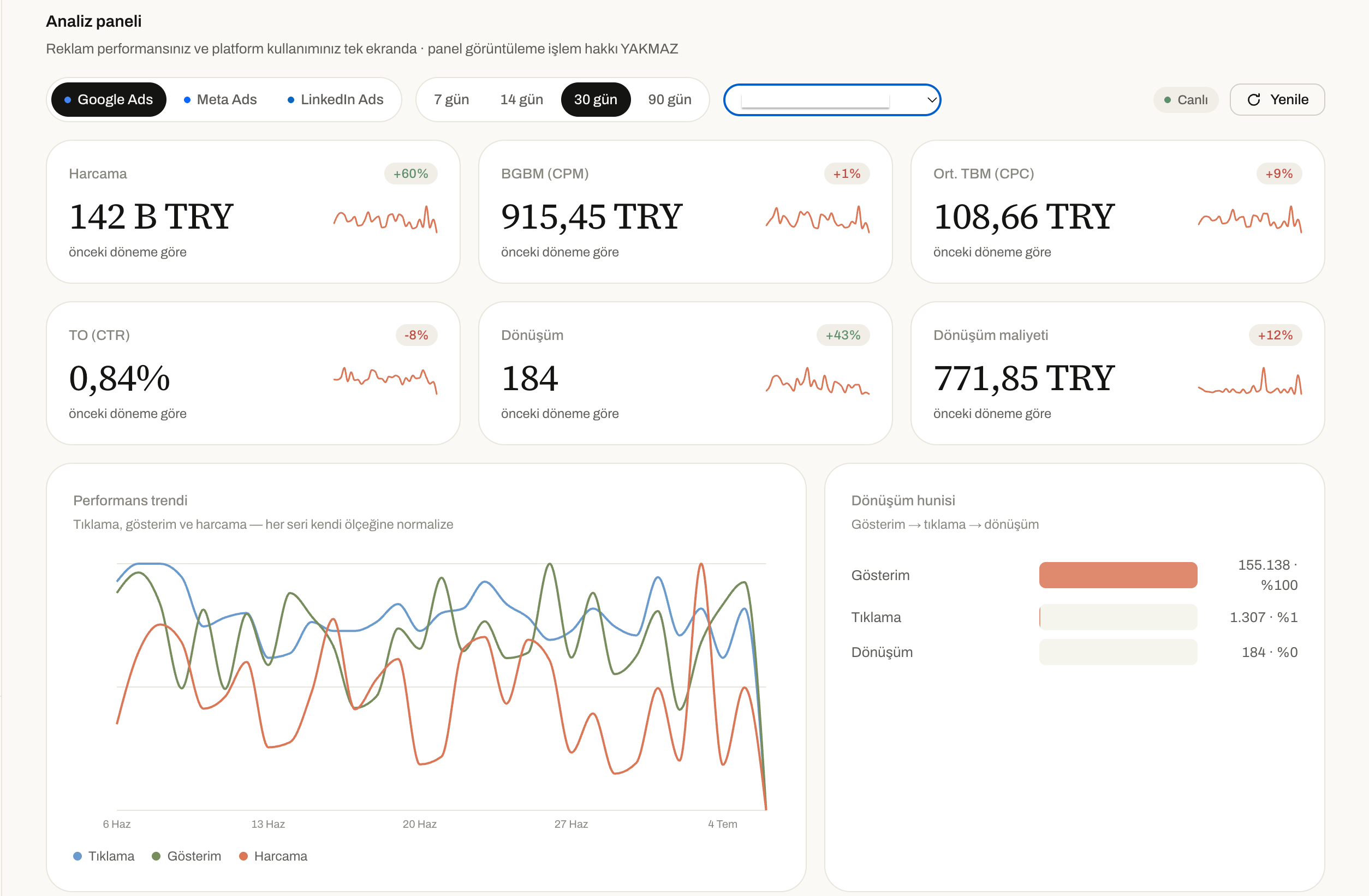
Opus Growth’s Insights dashboard brings your ad performance and platform usage together on a single screen. The best part: viewing the dashboard doesn’t burn an action credit—look as often as you like.
The core ad metrics you’ll track in the dashboard:
- Spend: Your total ad spend for the selected period and how it changed versus the previous one.
- CPM: Cost per thousand impressions—how efficiently your brand earns visibility.
- Avg. CPC: Average cost per click—how much your traffic really costs.
- CTR: Click-through rate—is your ad grabbing attention?
- Conversions: The total number of conversions your campaigns drove.
- Cost per conversion: The true cost of winning a single conversion (your most critical profitability signal).
Next to each metric you’ll find a mini trend chart and the percentage change from the previous period—so you can see at a glance whether things are improving or slipping.
Performance Trend and Conversion Funnel
The Performance trend chart at the bottom of the dashboard plots clicks, impressions, and spend on the same axis (each series normalized to its own scale)—so you can clearly see which metric is driving which. Beside it, the Conversion funnel sums up the journey: Impressions → Clicks → Conversions. For example, by watching 155,138 impressions turn into 1,307 clicks and then 184 conversions step by step, you can pinpoint exactly where the bottleneck is.
With a platform selector (Google Ads / Meta Ads / LinkedIn Ads), date-range options (7 / 14 / 30 / 90 days), and a live indicator, your data always stays current.
How Does It Work? AI Ad Management in 3 Steps
- Connect. Link your Google, Meta, and/or LinkedIn ad accounts through secure OAuth. You never share your password.
- Chat. Give Claude or ChatGPT instructions in plain language: “Pause any Instagram ads with a cost per conversion above ₺50.”
- Track. The assistant does the work, and you follow the results live in the Insights dashboard.
Behind the scenes, dozens of ready-made tools (campaign creation, budget optimization, audience management, negative keywords, creative, and reporting) do the heavy lifting—but all you do is chat.
Who Is It For?
- Small businesses and founders: Professional ad management without an agency budget.
- Performance marketers: Hand routine work to AI and focus on strategy.
- Agencies: Manage multiple accounts (including MCC) quickly from one place.
Frequently Asked Questions
Does the AI run my ads without me?
No. You stay in control. The AI acts only on your instructions—you approve every action and see the results in the dashboard.
Which AI assistants does it work with?
Any assistant that supports MCP (Model Context Protocol)—starting with Claude and ChatGPT. You’re not locked into a single app.
Does opening the dashboard use up my credits or action allowance?
No. Viewing the Insights dashboard doesn’t burn an action credit. Explore your live metrics as much as you want.
Is my data safe?
Accounts connect through OAuth, no passwords are stored, and you can remove connections anytime.
Start Managing Your Ads with AI Today
Running Google, Meta, and LinkedIn ads in one language, tracking performance live, and leaving the routine work to AI is now within reach. Start your free trial with Opus Growth and optimize your first campaign today—just by chatting with AI.
Connect your Google Ads to your AI assistant
Try everything in this article on your own account — 60-second setup, 7-day free trial, no credit card required.