Fill in before sending
[server name][event name][what it is, who it is for, which edition, two sentences][start and end, time zone][for each day the time, session title, speaker and room][organisation name][email][phone][whether talks are recorded and photos taken][domain][colour preference][event]
On the [server name] site on my Opus Growth hosting server, build a static, fast event site for [event name]. Event: [what it is, who it is for, which edition, two sentences]. Date and time: [start and end, time zone]. Venue: [venue name, full address, transport, parking, accessibility facilities]. Schedule: [for each day the time, session title, speaker and room]. Speakers: [name, title, organisation, talk title, bio, photo link and permission to publish the photo]. Tickets: [ticket types, prices, whether VAT is included, valid dates, the link on the ticketing platform, refund and transfer terms]. Organiser: [organisation name], [email], [phone]. Recording and photo policy: [whether talks are recorded and photos taken]. Domain: [domain].
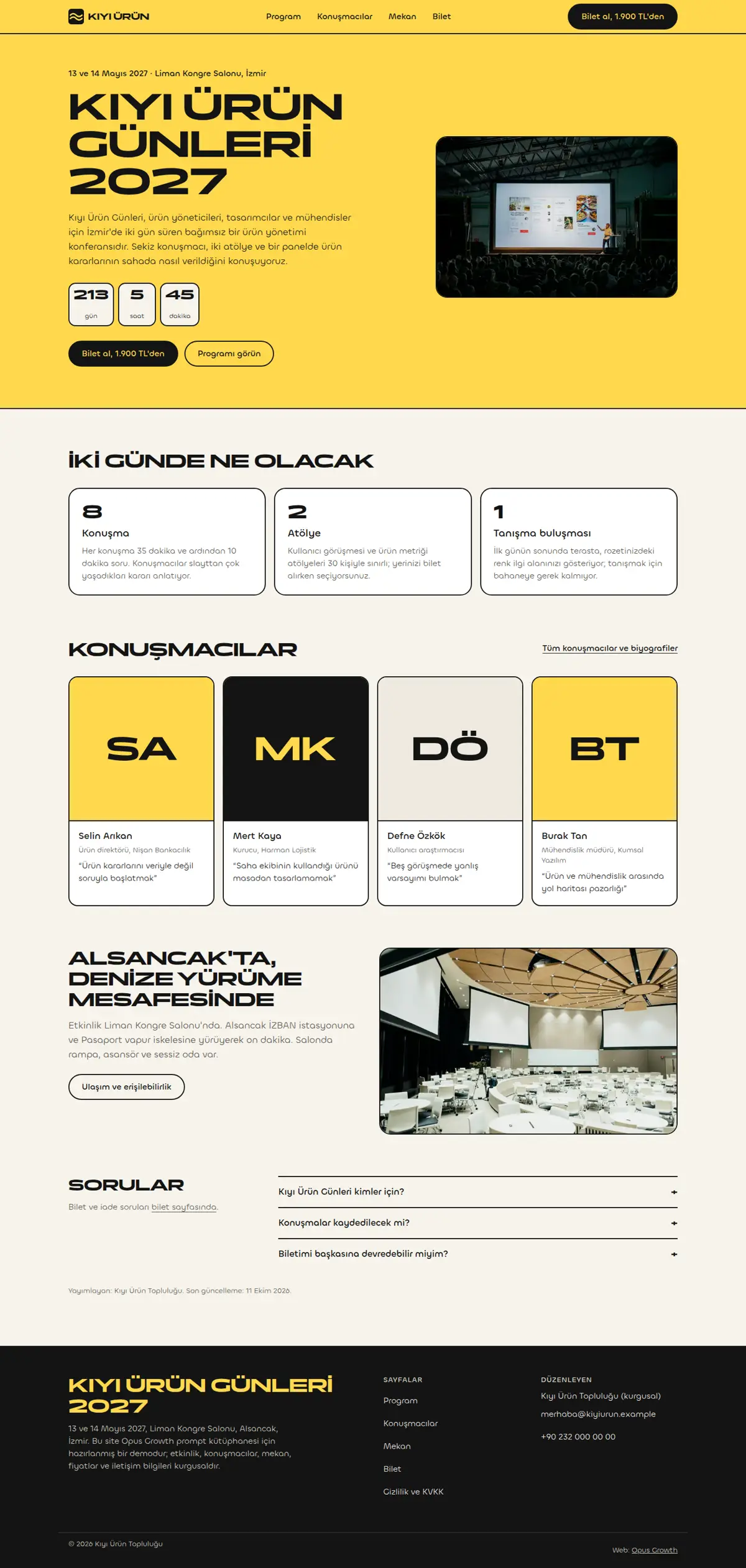
Pages: home (a date and venue line, countdown, short intro, what will happen, four of the speakers, a venue summary, FAQ), schedule (/program/: day tabs and an .ics calendar file), speakers (/konusmacilar/), tickets (/bilet/: ticket types, what is included, refunds, invoice FAQ), venue (/mekan/: address, transport, accessibility, accommodation), privacy (/gizlilik/, including the photo and recording choice) and 404.html.
Style: a conference poster. If no [colour preference] is given, a signal-yellow hero band, a cream background, black text and 2 pixel black borders. A wide, bold Fontshare face in capitals for headings (for example Panchang 700) and a rounded sans for body text (for example Chillax 400 and 500); preload all three first-screen files. Capitalisation needs `<html lang="tr">`, otherwise "i" becomes "I". If a speaker has no photo or no permission to publish one, use an initials monogram instead; never use someone else's photo.
Interaction rules (no library, one `ix.js` with defer, only on the home, schedule and speakers pages):
1. The countdown is correct even with JS off: the HTML holds the text "Starts: <time datetime="2027-05-13T09:00:00+03:00">Thursday 13 May 2027, 09.00</time> (Turkey time)" inside a fixed-height box. JS reads the ISO dates with time zone offsets from data-start and data-end with Date.parse and writes day, hour and minute boxes into the same box. The box must be the same height in both states (CSS min-height and a fixed unit height), otherwise the first screen shifts. Do not show seconds; update every minute and stop while the tab is hidden. The number boxes are aria-hidden with a single visually hidden sentence for screen readers next to them, and no live region (aria-live), because it would be read out every minute. Once the event has started write "happening now", after it ends write "has ended"; never show negative numbers for a past date.
2. Day tabs: in the HTML each day is a separate section with its own heading (id="gun-1", "gun-2") with links to those sections above them; with JS off all days are shown one under the other. The container around the links carries role="group" and an aria-label. JS turns them into ARIA tabs (tablist, tab, tabpanel, aria-selected, tabindex, arrow keys, Home and End), selects the second day when the page opens with #gun-2, and updates the URL with history.replaceState when the tab changes so a day can be shared as a link. Each session is a list row with a `<time datetime>`: time, title, a link to the speaker's anchor on the speakers page and the room; breaks get a separate background.
3. Speaker bio: in the HTML it sits in a `<details>` on every card, so it is readable with JS off and by search engines. JS intercepts the summary click, builds a single `<dialog>`, copies the name, title, talk title and bio into it with textContent, opens it with showModal and moves focus to the "Close" button; Esc and a backdrop click close it and focus returns to the summary. Add aria-haspopup="dialog" to the summary. Each card's id is the speaker's slug, which is where the schedule links point.
4. Sticky ticket call to action: a "Get tickets" button in the header on desktop, and on mobile a bar fixed to the bottom of the screen (date, lowest price and "Get tickets"). The bar is static HTML in the footer template and is position: fixed from the first paint; adding it later with JS causes a layout shift. On mobile give the body bottom padding equal to the bar's height so the last links do not hide under it, add `env(safe-area-inset-bottom)`, and hide the bar on the tickets page through a class on the body.
5. Calendar file: `/assets/[event].ics` downloaded from the schedule page (VCALENDAR with one VEVENT, DTSTART and DTEND in UTC, SUMMARY, LOCATION, URL, CRLF line endings). Give the link the download attribute.
Schema: the same Event (@id /#event) on the home, schedule and tickets pages: name, description, startDate and endDate with a time zone offset, eventStatus EventScheduled, eventAttendanceMode OfflineEventAttendanceMode, location as a Place with a complete PostalAddress, three images in 1x1, 4x3 and 16x9 ratios, organizer, the speakers as performer and an offers array (for every ticket type name, price, priceCurrency "TRY", availability, validFrom, validThrough for early bird, and the sales page as url). Google's event rich result requires location and startDate and does not merge @id across pages, so write the Event in full on every page that uses it; on the schedule page also add each session as a subEvent. If the event is postponed or cancelled, set eventStatus to EventPostponed or EventCancelled instead of deleting the page. Place on the venue page and BreadcrumbList on every inner page. Sponsors, attendee numbers or "sold out" are written only if true.
Setup and known pitfalls (each one cost points in the demo measurements, do not skip any):
1. If a site is already live on the server, tell me first, because setup overwrites index.html and the assets folder. Preview scaffold_site with confirm=false, and call it with confirm=true only after I approve. Then read site_design_guide and site_seo_guide. Before writing code, put the design direction (typography, colours, grid, signature element, motion language and the libraries that will NOT be loaded) in a short ART.md file outside assets and show it to me.
2. Compile Tailwind, do not load it from the CDN. Install it with site_run_command and background=true (`npm i -D tailwindcss@3`) and follow it with site_command_status. The content paths in `tailwind.config.js` must cover every HTML file, the `_src` templates and any JS file that writes classes. `_src/tw.css` holds the line `@import "../assets/app.css";` plus the three `@tailwind` lines; compile it into a single file with `npx tailwindcss -c tailwind.config.js -i _src/tw.css -o assets/site.css --minify`. Remove the cdn.tailwindcss.com script and the inline tailwind.config from every page and link only `/assets/site.css`. Recompile after every HTML change.
3. Host the fonts yourself. Read the CSS of the Fontshare family you chose, download each weight's woff2 separately with site_fetch into `assets/fonts/`, and write the @font-face rules with `font-display: swap` into `assets/app.css`, which is where design-check looks for a custom font. Check the font-family name in the downloaded CSS and confirm the family has the Turkish letters ı, İ, ş and ğ (Tanker has no ı). Preload EVERY weight used in the first screen with `<link rel="preload" as="font" type="font/woff2" crossorigin>`, placed before the stylesheet line; if that is more than three files, use fewer weights. In the demo a single body weight that was not preloaded pushed mobile LCP to 2.6 seconds and Performance down to 97. Most Fontshare fonts lack the ₺ sign, so write prices with "TL".
4. Make the menu and footer static HTML. Do not load chrome.js, motion.js or site.config.js on the pages. Write a small `chrome-stamp.mjs` that reads the nav list from site.config.js and stamps `_src/header.tpl` and `_src/footer.tpl` between the `<!-- nav:start --><!-- nav:end -->` and `<!-- footer:start --><!-- footer:end -->` markers on every page, adding aria-current="page" to the active link. Use placeholders like `[[NAV]]` instead of `{{...}}` and do not give the templates an .html extension, otherwise design-check and seo-check treat them as half-finished pages. Build the mobile menu with a JS-free `<details>`. Keep the business name, address and phone as plain text in the footer, and make footer and breadcrumb links at least 44 pixels tall.
5. Convert images while fetching them with site_fetch: write the same image as separate files with resize="480x", "800x" and "1200x", image_format="webp", quality=60 (site_fetch does not crop, so request the source at the ratio you need). Give every `<img>` srcset, sizes and width and height that match the real ratio. The image that is the page's LCP element gets fetchpriority="high" and is not lazy; every other image gets loading="lazy" decoding="async". If an image fills the first mobile screen, serve a smaller crop to mobile with `<picture>`.
6. Add `<link rel="icon" href="/favicon.svg" type="image/svg+xml">` to every page and make a 180 pixel apple-touch-icon from the logo with site_fetch and resize="180x180". Without a favicon link the browser requests /favicon.ico, logs a 404 and Best Practices drops to 96.
7. HTML validator rules: start each document with an uppercase `<!DOCTYPE html>`; every space in the visible text of a tel: link must be ` `, including the one after a prefix such as "Call: 0212..."; do not use style=""; give every button a type; put aria-label only on landmarks, forms or interactive elements (on a ul or a role-less div it was an error); never label two landmarks with the same name; leave no trailing whitespace.
8. Do not skip heading levels: on a list page, card titles as h3 straight after the h1 dropped Accessibility to 98. When you reuse a card, set its heading level per page (h2 on a list page, h3 inside an h2 section).
9. Name the motion attribute data-reveal (design-check only recognises motion by that name). JS gives the hidden starting state only to blocks that are below the screen when the page opens, and never hides first-screen content; use transform, because fading with opacity lowers the contrast audit. Put the attribute on the block that wraps a heading and its description, not on the heading alone; in the demo a waiting heading slid over the paragraph below it. With prefers-reduced-motion: reduce nothing is hidden and animations are off.
SEO, AEO and GEO:
1. Use directory-style URLs with a trailing slash. Fill the seo block of site.config.js and run `node seo-stamp.mjs`. Write page-specific schema in separate `<script type="application/ld+json">` blocks linked to the base graph with @id. Do not nest BreadcrumbList inside @graph; keep it in its own block, which is the only way seo-check sees it.
2. Titles at most 60 characters (seo-check flags anything under 25 or over 65 as an error), descriptions 130 to 158 characters, one h1 per page, and at least 150 words of main content on every page. Contact, privacy and list pages tend to fall short; add page-specific information, not filler.
3. The first paragraph of every page answers the page's question directly. Write page-specific FAQs with `<details>` and mark them up as FAQPage. Show the publisher and a "Last updated" date in a `<time>` element.
4. In robots.txt, write your decision with a reason for GPTBot, OAI-SearchBot, ChatGPT-User, ClaudeBot, Claude-User, Claude-SearchBot, PerplexityBot, Perplexity-User, Google-Extended, Applebot-Extended, Bingbot and CCBot, and point to the sitemap. sitemap.xml carries real lastmod dates. llms.txt holds an accurate two-sentence summary of the site and a list of the important pages.
5. No fabrication: do not write reviews, ratings, awards, customer counts, certificates, opening hours, coordinates or prices without asking me. Leave any field you do not know out of the schema entirely.
Gates (in order; do not say "done" until all pass):
1. With site_run_command run `node chrome-stamp.mjs`, the Tailwind build, `node seo-stamp.mjs`, `node seo-check.mjs` (0 errors, 0 warnings), `node design-check.mjs` (0 errors; justify any remaining warning) and `npx html-validate "**/*.html"` (0 errors).
2. View every page with site_preview, view="mobile" and view="desktop". site_preview captures the page with motion off (reduced-motion); if content is missing in that capture, the static state is broken. In full-page captures, fixed elements such as a sticky bar can appear mid-page and lazy images further down can be blank; do not count those as errors, but check their paths.
3. Run core_web_vitals for every page with strategy="mobile" and strategy="desktop". Acceptance: on mobile Performance at least 95 (target 99 to 100) and Accessibility, Best Practices and SEO 100; on desktop all four at 100. For a page that misses, use resources=true to find the file that delays it, fix it and measure again. Then run seo_audit on the home page with strategy="mobile" and runs=2. No address outside your own domain may remain in the network request list.
4. No horizontal scrolling at 360, 390, 768 and 1440 pixels wide, touch targets at least 44 pixels, no console errors.
Interaction check: site_preview cannot show time, tabs or dialogs. Tell me how to check that the countdown shows the correct date with JavaScript off and turns into boxes of the same height with JS on, that /program/#gun-2 opens the second day and the tabs switch with the arrow keys, that a speaker bio opens in a modal and focus returns after Esc, that on a phone the ticket bar does not cover the last links of the page, that the calendar file lands in the phone's calendar at the right time, and that Google's Rich Results Test shows the Event without errors.
After publishing: preview the rule `/assets/* Cache-Control: public, max-age=31536000, immutable` with site_headers and apply it once I approve; from then on, version the file name whenever CSS or JS changes (site-v2.css and so on). Submit sitemap.xml with gsc_submit_sitemap and check the home page with gsc_url_inspect. At the end give me: a page-by-page score table (page, four mobile scores, four desktop scores, LCP, CLS), the result of each gate and the list of fixes you applied.