Fill in before sending
[product or startup name][server name][what it does, for whom][three steps][4 to 6 features][plan names and prices, or "no pricing page"][App Store, Google Play or sign-up URL][email][phone][WhatsApp number][address][domain]
Build a neo-brutalist, multi-page, JavaScript-free product site for [product or startup name] on the [server name] site on my Opus Growth hosting server. Product: [what it does, for whom]. How it works: [three steps]. Key features: [4 to 6 features]. Pricing: [plan names and prices, or "no pricing page"]. Download or sign-up links: [App Store, Google Play or sign-up URL]. Contact: [email], [phone], [WhatsApp number], [address]. Domain: [domain]. Brand colours: [colours, or "you choose"]. Real photos or screenshots: [links, or "none"].
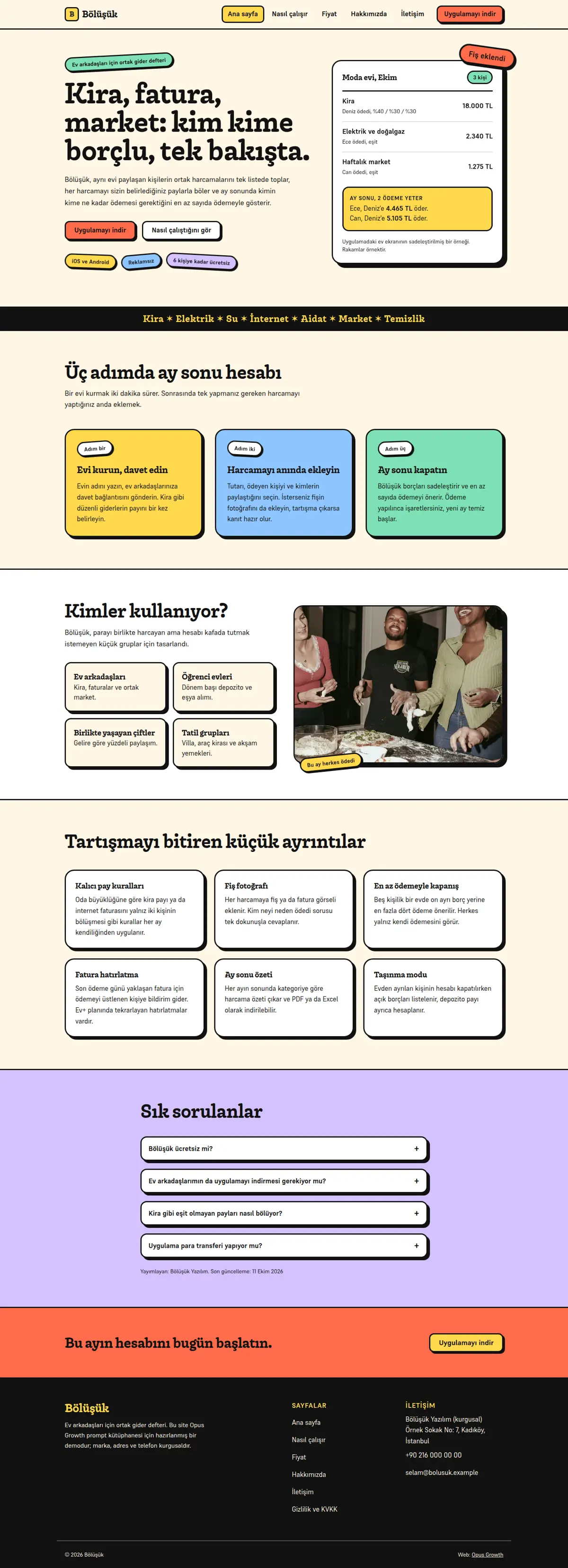
Pages: home (/), how it works (/nasil-calisir/ or /how-it-works/), pricing (/fiyat/), about (/hakkimizda/), contact (/iletisim/), privacy (/gizlilik/) and 404.html. Home sections in order: hero (h1, two-sentence intro, two buttons, sticker badges and the signature element), category strip, three steps, who it is for (with a photo), features, FAQ and a closing call to action. No form on the contact page; email, phone, a WhatsApp link with a prefilled message and the download links instead, because the server only serves static files.
Style: neo-brutalist, but like a product, not a toy. Thick black borders (3 pixels), hard shadows with no blur (black only, offset 4, 6 and 10 pixels), flat bright colour blocks (at most five flat colours such as tomato, lemon, mint, sky blue and lilac on a cream background), slightly tilted badges that look like stickers. Typography: a chunky, characterful display face from Fontshare (for example Chubbo) with a calm grotesk for body text (for example Supreme 400 and 700). No gradients, no glass effect, no soft shadows and no purple to blue blends. The site has no JavaScript at all; GSAP, Lenis and Swiper are not loaded. Signature element: on the right of the hero, a thick-bordered card that draws the product's main screen in real HTML instead of an image (for example a household's expenses this month and the month-end settlement), with stickers stuck around it.
Colour, contrast and motion rules (where this style loses points most easily):
1. Write text in black on every coloured background and never use white text. Calculate the contrast ratio of each colour against black and put it in ART.md as a table; darken any colour below 4.5. In the demo the lowest ratio was 6.7 on tomato orange, and accessibility was 100 on every page.
2. Make the focus ring 3 pixels of black with a 3 pixel offset, switching to lemon yellow in a black footer. Use outline-offset so the focus ring does not merge with the thick border.
3. Do the playful offset of buttons and cards with transform and box-shadow only: on hover translate(-2px, -2px) and a larger shadow, on press translate(4px, 4px) and no shadow. Buttons are at least 48 pixels tall, small buttons at least 44.
4. Put the sticker tilt in the separate `rotate` property, not in transform, and set the angle with a Tailwind arbitrary property class such as `[--r:-4deg]`. That way the stickers stay tilted even when the reduced-motion rule resets transform, and no style="" attribute is needed.
5. Run the stickers' "slap on" entrance with `scale` and `translate` only, inside `@media (prefers-reduced-motion: no-preference)` and with a data-reveal="slap" attribute (design-check recognises motion by that attribute). No hiding with opacity, and the h1 never moves. With prefers-reduced-motion: reduce, every animation and transition is off.
6. Mark decorative stickers aria-hidden="true"; badges that carry information (for example "free for up to 6 people") stay as plain list items. On mobile, hide a decorative sticker below 640 pixels if it overlaps another badge at the corner of the card; in the demo the "receipt added" sticker covered the "3 people" badge at 390 pixels.
Setup and known traps (each one cost points or failed a gate in the demo measurement, do not skip):
1. If a site is already live on the server, tell me first, because setup overwrites index.html and the assets folder. Preview scaffold_site with confirm=false first, then call confirm=true once I approve. Then read site_design_guide and site_seo_guide. Before writing code, write the design direction (typography, colour, grid, signature element, motion language and the libraries that will NOT be loaded) into a short ART.md outside assets and show it to me.
2. Compile Tailwind, do not load it from the CDN. Install `npm i -D tailwindcss@3` with site_run_command and background=true, and follow it with site_command_status. The content paths in `tailwind.config.js` must cover every HTML file including subfolders, the `_src/*.tpl` templates and any JS file that writes classes. `_src/tw.css` holds the line `@import "../assets/app.css";` and the three `@tailwind` lines; compile it into one file with `npx tailwindcss -c tailwind.config.js -i _src/tw.css -o assets/site.css --minify`. Remove the cdn.tailwindcss.com script, the inline tailwind.config, chrome.js and motion.js from the pages and link only `/assets/site.css`. Recompile after every HTML change. This site has no JavaScript files, so the content list needs no JS entries.
3. Self-host the fonts. Read the Fontshare CSS with one request per family and weight (`https://api.fontshare.com/v2/css?f[]=family@weight`), download each woff2 file into `assets/fonts/` with site_fetch and write the @font-face rules with `font-display: swap` into `assets/app.css`; design-check looks for the custom font there. Preload EVERY weight used above the fold (heading, body and buttons) on every page with `<link rel="preload" as="font" type="font/woff2" crossorigin>` and put these lines before the stylesheet link. Most Fontshare fonts have no ₺ sign, so write prices with "TL".
4. Make the menu and footer static HTML. Write a small `chrome-stamp.mjs` that reads the nav list from site.config.js and stamps `_src/header.tpl` and `_src/footer.tpl` between the `<!-- nav:start --><!-- nav:end -->` and `<!-- footer:start --><!-- footer:end -->` markers on every page, adding aria-current="page" to the active link. Do not give the templates a .html extension and use placeholders like `[[NAV]]` instead of `{{...}}`. Build the mobile menu with `<details>` and no JS. Keep the business name, address and phone in the footer as plain text, and make footer and breadcrumb links at least 44 pixels tall.
5. Convert images while downloading them with site_fetch: write the same photo to separate files with resize="480x", "800x" and "1120x" (or the widths the page needs), image_format="webp" and quality=65. Give every `<img>` srcset, sizes and a width and height that match the real ratio. The main above-the-fold image gets fetchpriority="high" and is not lazy; give fetchpriority only to the real LCP element, and loading="lazy" decoding="async" to the rest.
6. Write a small `favicon.svg` in the site root and add `<link rel="icon" href="/favicon.svg" type="image/svg+xml">` to every page; if there is a PNG logo, make an apple-touch-icon with site_fetch, resize="180x180" and image_format="png". Without a favicon the browser logs a 404 for /favicon.ico and Best Practices drops to 96.
7. HTML validator rules: start every document with an uppercase `<!DOCTYPE html>`, quote attributes with double quotes, use ` ` for the spaces in the visible text of tel: links, never use a style="" attribute (if you need a CSS variable, use a Tailwind arbitrary property class such as `[--r:-4deg]`), give every button type="button", do not put aria-label on role-less elements such as `<ul>` or `<div>`, and use `<section aria-label="...">` instead of role="region".
8. If the footer has a black background, make its links cream with a lemon hover, and keep each at least 44 pixels tall.
SEO, AEO and GEO:
1. Use directory-style URLs with a trailing slash (/nasil-calisir/, /fiyat/, /hakkimizda/, /iletisim/, /gizlilik/ or their equivalents in your language). Fill in the seo block of site.config.js and run `node seo-stamp.mjs`. For a startup with no physical shop, set localBusiness:false in site.config.js. Page schemas: home WebPage and FAQPage; how it works WebPage and FAQPage; pricing SoftwareApplication (applicationCategory, operatingSystem and an Offer per plan) and FAQPage; about AboutPage; contact ContactPage; BreadcrumbList on inner pages. Because you will not add user reviews or ratings to SoftwareApplication, Google may not show an app rich result; that is fine, do not invent a rating. Write every page-specific schema in its own `<script type="application/ld+json">` block and link it to the base graph with @id. Do not nest BreadcrumbList inside @graph; keep it in its own block, because that is the only way seo-check sees it.
2. Titles 48 to 60 characters (seo-check treats over 65 as an error), descriptions 145 to 158 characters, one h1 per page. The main content of every page is at least 150 words. In the demo the about, contact and privacy pages came in at 113 to 148 words on the first try; add real information to them, such as "what to include in a support request" or "who the data is shared with".
3. The first paragraph of every page answers the page's question directly, and the h1 is phrased as that question. Write the page's own FAQ with `<details>` and mark it up as FAQPage. Show the publishing organisation and a "Last updated" date with `<time datetime>`.
4. In robots.txt, write your decision with the reason for GPTBot, OAI-SearchBot, ChatGPT-User, ClaudeBot, Claude-User, Claude-SearchBot, PerplexityBot, Perplexity-User, Google-Extended, Applebot-Extended, Bingbot and CCBot, and point to the sitemap. sitemap.xml has a real lastmod. llms.txt has an accurate two-sentence summary of the site and a list of the important pages.
5. No invention: do not write reviews, ratings, awards, customer counts, certificates, opening hours, coordinates, prices or product figures without asking me. Leave any field you do not know out of the schema entirely.
Gates (in order; do not say "done" until all pass):
1. With site_run_command, run in order `node chrome-stamp.mjs`, the Tailwind build, `node seo-stamp.mjs`, `node seo-check.mjs` (0 errors, 0 warnings), `node design-check.mjs` (0 errors; justify any remaining warning) and `npx html-validate "**/*.html"` (0 errors).
2. View every page with site_preview, view="mobile" and view="desktop". site_preview captures the page with motion turned off; if the content is not complete in that capture, the no-motion state is broken. Lazy images further down may be blank in a full-page capture; do not count that as an error, but check their paths.
3. Run core_web_vitals for every page with strategy="mobile" and strategy="desktop". Acceptance: on mobile Performance at least 95 and Accessibility, Best Practices and SEO at 100; on desktop all four at least 95, target 100. For a page that misses, find the slow file with resources=true, fix it and measure again. Then run seo_audit on the home page with strategy="mobile" and runs=2. The network request list must contain no address outside your own domain (store and WhatsApp links are links, not requests).
4. No horizontal scrolling at 360, 390, 768 and 1440 pixels wide, touch targets at least 44 pixels, no console errors.
Interaction check: since site_preview cannot show motion, tell me what to look for in my own browser: a button lifts up and to the left on hover and sinks into its shadow on press; the stickers slap on gently as the page loads; tabbing shows a thick black focus ring on every link; with reduce motion turned on in the operating system nothing moves but the stickers stay tilted; with JavaScript off the mobile menu still opens.
After publishing: preview the rule `/assets/* Cache-Control: public, max-age=31536000, immutable` with site_headers and apply it once I approve; from then on, version the file name whenever CSS or JS changes (site-v2.css and so on). Submit sitemap.xml with gsc_submit_sitemap and check the home page with gsc_url_inspect. At the end give me: a per-page score table (page, four mobile scores, four desktop scores, LCP, CLS), the gate results and the list of fixes you applied.