Fill in before sending
[server name][agency name][city, the districts I work in, sale or rent][licence no][phone][WhatsApp number][email][office address][domain][district-neighbourhood-for-sale-rooms-type][slug][[FIYAT]
On the [server name] site on my Opus Growth hosting server, build a static, fast listings site for my estate agency [agency name] that generates every listing from one JSON file. Agency: [city, the districts I work in, sale or rent]. My real estate trade licence number (Taşınmaz Ticareti Yetki Belgesi): [licence no]. Listings: [for each listing the listing no, title, district, neighbourhood, rooms, gross and net square metres, floor, year built, heating, service charge, title deed status, price, listing date, a two-paragraph description, four key features, photo links and the location detail the owner has agreed to show]. Contact: [phone], [WhatsApp number], [email], [office address]. Domain: [domain].
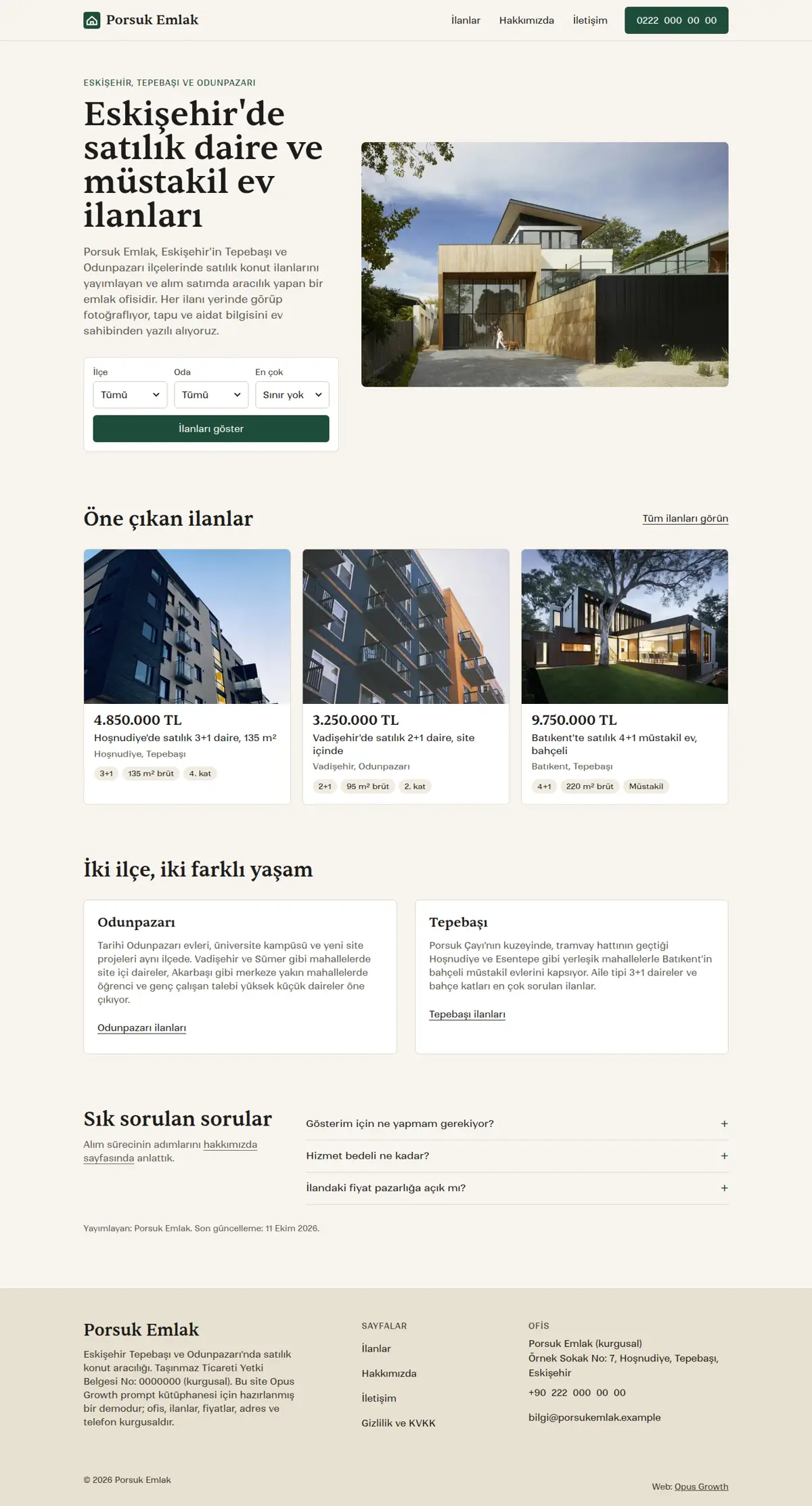
Pages: home (a search form for district, rooms and maximum price, featured listings, a district guide, FAQ), listings (/ilanlar/: filters, result count, listing grid, listing FAQ), a page per listing (/ilanlar/[district-neighbourhood-for-sale-rooms-type]/), about (/hakkimizda/: the steps of buying and the licence), contact (/iletisim/, no form), privacy (/gizlilik/) and 404.html.
Style: warm editorial real estate. A light sand background, ink text, a single dark accent such as pine green (white text on buttons), a Fontshare serif for headings and prices (for example Sentient 500) and a sans for body text (for example Ranade 400). Listing cards with a 4:3 photo, a large serif price and small tags for rooms, square metres and floor. The card photo zooms slightly on hover. No map library, no Google Maps iframe, no gallery or slider library is loaded.
Single source and generation:
1. All listing data lives in `assets/ilanlar.json`. Write a small `ilan-build.mjs` and run it with site_run_command as `node ilan-build.mjs`: (a) it generates `ilanlar/[slug]/index.html` for every listing from the `_src/ilan.tpl` template, (b) it stamps all cards between `<!-- ilanlar:start --><!-- ilanlar:end -->` in `ilanlar/index.html` and the featured ones between `<!-- one-cikan:start --><!-- one-cikan:end -->` on the home page, (c) it writes the ItemList schema of the listing page between `<!-- ilan-ld:start --><!-- ilan-ld:end -->`. Use placeholders like `[[FIYAT]]` in the template, not `{{...}}`. Order: ilan-build, chrome-stamp, the Tailwind build, seo-stamp. Adding a listing or removing a sold one should mean editing the JSON and running this order again; when a sold listing's page is deleted, redirect its URL to /ilanlar/ with site_redirects.
2. The cards are static HTML generated on the server, so every listing is visible with JS off and to search engines. Each card carries data-ilce, data-oda, data-fiyat, data-m2 and data-tarih attributes for the filter; component class names must not clash with Tailwind utilities (use a prefix such as lcard).
Filter rules:
1. The filter is a real form with action="/ilanlar/" and method="get": labelled selects for district, rooms, minimum price, maximum price and sort order, plus a "Filter" button. With JS off the form fills the URL but the list does not change; say so in one sentence inside `<noscript>`.
2. `ilan-filtre.js` loads with defer on /ilanlar/ only: on load it reads ?ilce=&oda=&min=&max=&sira= with URLSearchParams (accepting only values that exist in the selects), hides and shows cards with hidden, reorders the DOM for sorting and updates the URL with history.replaceState on every change. The filtered list can be shared as a link and the back button history does not fill up.
3. Announce the result count in a role="status" sentence ("2 of 6 listings match your filters"). With no results show an empty-state message and a "Clear filters" link. The filter box is in the first screen, so JS must not add or hide anything there; only the cards change, otherwise you get a layout shift (CLS).
4. On the listings page the first card photo is not lazy and the rest are; card titles are h2 on this page and h3 under the "Featured listings" h2 on the home page.
Listing page:
1. The first paragraph sums the listing up in one sentence: neighbourhood, district, rooms, square metres, year built and price. Then the photo strip: figures that scroll sideways with CSS scroll-snap and no JS, with thumbnails below that are in-page links to each photo. `galeri.js` (listing pages only) intercepts thumbnail clicks, scrolls only the strip without making the page jump, and marks the visible photo's thumbnail with aria-current="true" through an IntersectionObserver. The first photo is the page's LCP element: fetchpriority="high", not lazy.
2. A sticky price box in the right column: the price, a facts list (dl: price, listing no, rooms, gross and net square metres, floor, year built, heating, service charge, title deed, listing date), a WhatsApp link with a prefilled message that includes the listing number, the phone and the licence number. Turkish rules expect the licence number on property listings; put it in the footer as well.
3. Location: do not publish the full address. Use a local static map image that shows the approximate location at the level the owner agreed to (usually the neighbourhood) and say below it that the full address is shared at the viewing. If you build the map from OpenStreetMap tiles, follow the tile usage policy (once per listing, a few tiles, no bulk downloads): fetch the tiles with site_fetch into `_src/harita/`, install sharp with site_run_command and background=true (`npm i -D sharp`), then use a small script to stitch the tiles, crop around the centre, mark the approximate area with a semi-transparent circle and save 480 and 768 pixel WebP files. If the crop runs past the tile area a black strip appears at the edge; fetch at least 5x3 tiles around the centre. Write the "© OpenStreetMap contributors" credit both inside the image and as a link under it. The map loads lazily and no external map script enters the page.
Schema: on the listing page RealEstateListing (url, name, description, datePosted, an image array, offers with an Offer: price, priceCurrency "TRY", availability and the business @id as seller) with an Apartment or SingleFamilyResidence as mainEntity (numberOfRooms, numberOfBedrooms, numberOfBathroomsTotal, floorSize as QuantitativeValue with unitCode "MTK", yearBuilt, and an address with only district, province and country). Google shows no dedicated rich result for these types; the point is that search and AI engines read the price, room count and location correctly. CollectionPage and ItemList on the listings page, businessType "RealEstateAgent" in seo-stamp for the agency, BreadcrumbList on every inner page. Take price, square metres, service charge and deed details only from the owner's written statement; leave anything you do not know out of both the JSON and the schema.
Setup and known pitfalls (each one cost points in the demo measurements, do not skip any):
1. If a site is already live on the server, tell me first, because setup overwrites index.html and the assets folder. Preview scaffold_site with confirm=false, and call it with confirm=true only after I approve. Then read site_design_guide and site_seo_guide. Before writing code, put the design direction (typography, colours, grid, signature element, motion language and the libraries that will NOT be loaded) in a short ART.md file outside assets and show it to me.
2. Compile Tailwind, do not load it from the CDN. Install it with site_run_command and background=true (`npm i -D tailwindcss@3`) and follow it with site_command_status. The content paths in `tailwind.config.js` must cover every HTML file, the `_src` templates and any JS file that writes classes. `_src/tw.css` holds the line `@import "../assets/app.css";` plus the three `@tailwind` lines; compile it into a single file with `npx tailwindcss -c tailwind.config.js -i _src/tw.css -o assets/site.css --minify`. Remove the cdn.tailwindcss.com script and the inline tailwind.config from every page and link only `/assets/site.css`. Recompile after every HTML change.
3. Host the fonts yourself. Read the CSS of the Fontshare family you chose, download each weight's woff2 separately with site_fetch into `assets/fonts/`, and write the @font-face rules with `font-display: swap` into `assets/app.css`, which is where design-check looks for a custom font. Check the font-family name in the downloaded CSS and confirm the family has the Turkish letters ı, İ, ş and ğ (Tanker has no ı). Preload EVERY weight used in the first screen with `<link rel="preload" as="font" type="font/woff2" crossorigin>`, placed before the stylesheet line; if that is more than three files, use fewer weights. In the demo a single body weight that was not preloaded pushed mobile LCP to 2.6 seconds and Performance down to 97. Most Fontshare fonts lack the ₺ sign, so write prices with "TL".
4. Make the menu and footer static HTML. Do not load chrome.js, motion.js or site.config.js on the pages. Write a small `chrome-stamp.mjs` that reads the nav list from site.config.js and stamps `_src/header.tpl` and `_src/footer.tpl` between the `<!-- nav:start --><!-- nav:end -->` and `<!-- footer:start --><!-- footer:end -->` markers on every page, adding aria-current="page" to the active link. Use placeholders like `[[NAV]]` instead of `{{...}}` and do not give the templates an .html extension, otherwise design-check and seo-check treat them as half-finished pages. Build the mobile menu with a JS-free `<details>`. Keep the business name, address and phone as plain text in the footer, and make footer and breadcrumb links at least 44 pixels tall.
5. Convert images while fetching them with site_fetch: write the same image as separate files with resize="480x", "800x" and "1200x", image_format="webp", quality=60 (site_fetch does not crop, so request the source at the ratio you need). Give every `<img>` srcset, sizes and width and height that match the real ratio. The image that is the page's LCP element gets fetchpriority="high" and is not lazy; every other image gets loading="lazy" decoding="async". If an image fills the first mobile screen, serve a smaller crop to mobile with `<picture>`.
6. Add `<link rel="icon" href="/favicon.svg" type="image/svg+xml">` to every page and make a 180 pixel apple-touch-icon from the logo with site_fetch and resize="180x180". Without a favicon link the browser requests /favicon.ico, logs a 404 and Best Practices drops to 96.
7. HTML validator rules: start each document with an uppercase `<!DOCTYPE html>`; every space in the visible text of a tel: link must be ` `, including the one after a prefix such as "Call: 0212..."; do not use style=""; give every button a type; put aria-label only on landmarks, forms or interactive elements (on a ul or a role-less div it was an error); never label two landmarks with the same name; leave no trailing whitespace.
8. Do not skip heading levels: on a list page, card titles as h3 straight after the h1 dropped Accessibility to 98. When you reuse a card, set its heading level per page (h2 on a list page, h3 inside an h2 section).
9. Name the motion attribute data-reveal (design-check only recognises motion by that name). JS gives the hidden starting state only to blocks that are below the screen when the page opens, and never hides first-screen content; use transform, because fading with opacity lowers the contrast audit. Put the attribute on the block that wraps a heading and its description, not on the heading alone; in the demo a waiting heading slid over the paragraph below it. With prefers-reduced-motion: reduce nothing is hidden and animations are off.
SEO, AEO and GEO:
1. Use directory-style URLs with a trailing slash. Fill the seo block of site.config.js and run `node seo-stamp.mjs`. Write page-specific schema in separate `<script type="application/ld+json">` blocks linked to the base graph with @id. Do not nest BreadcrumbList inside @graph; keep it in its own block, which is the only way seo-check sees it.
2. Titles at most 60 characters (seo-check flags anything under 25 or over 65 as an error), descriptions 130 to 158 characters, one h1 per page, and at least 150 words of main content on every page. Contact, privacy and list pages tend to fall short; add page-specific information, not filler.
3. The first paragraph of every page answers the page's question directly. Write page-specific FAQs with `<details>` and mark them up as FAQPage. Show the publisher and a "Last updated" date in a `<time>` element.
4. In robots.txt, write your decision with a reason for GPTBot, OAI-SearchBot, ChatGPT-User, ClaudeBot, Claude-User, Claude-SearchBot, PerplexityBot, Perplexity-User, Google-Extended, Applebot-Extended, Bingbot and CCBot, and point to the sitemap. sitemap.xml carries real lastmod dates. llms.txt holds an accurate two-sentence summary of the site and a list of the important pages.
5. No fabrication: do not write reviews, ratings, awards, customer counts, certificates, opening hours, coordinates or prices without asking me. Leave any field you do not know out of the schema entirely.
Gates (in order; do not say "done" until all pass):
1. With site_run_command run `node chrome-stamp.mjs`, the Tailwind build, `node seo-stamp.mjs`, `node seo-check.mjs` (0 errors, 0 warnings), `node design-check.mjs` (0 errors; justify any remaining warning) and `npx html-validate "**/*.html"` (0 errors).
2. View every page with site_preview, view="mobile" and view="desktop". site_preview captures the page with motion off (reduced-motion); if content is missing in that capture, the static state is broken. In full-page captures, fixed elements such as a sticky bar can appear mid-page and lazy images further down can be blank; do not count those as errors, but check their paths.
3. Run core_web_vitals for every page with strategy="mobile" and strategy="desktop". Acceptance: on mobile Performance at least 95 (target 99 to 100) and Accessibility, Best Practices and SEO 100; on desktop all four at 100. For a page that misses, use resources=true to find the file that delays it, fix it and measure again. Then run seo_audit on the home page with strategy="mobile" and runs=2. No address outside your own domain may remain in the network request list.
4. No horizontal scrolling at 360, 390, 768 and 1440 pixels wide, touch targets at least 44 pixels, no console errors.
Interaction check: site_preview cannot operate the filter. Tell me how to check that opening /ilanlar/?ilce=[district]&oda=3%2B1 shows only matching listings and fills the form, that changing a select updates the address bar, that the empty-state message appears when nothing matches, that every listing is shown with JavaScript off, and that clicking a thumbnail on a listing page scrolls only the photo strip without making the page jump.
After publishing: preview the rule `/assets/* Cache-Control: public, max-age=31536000, immutable` with site_headers and apply it once I approve; from then on, version the file name whenever CSS or JS changes (site-v2.css and so on). Submit sitemap.xml with gsc_submit_sitemap and check the home page with gsc_url_inspect. At the end give me: a page-by-page score table (page, four mobile scores, four desktop scores, LCP, CLS), the result of each gate and the list of fixes you applied.